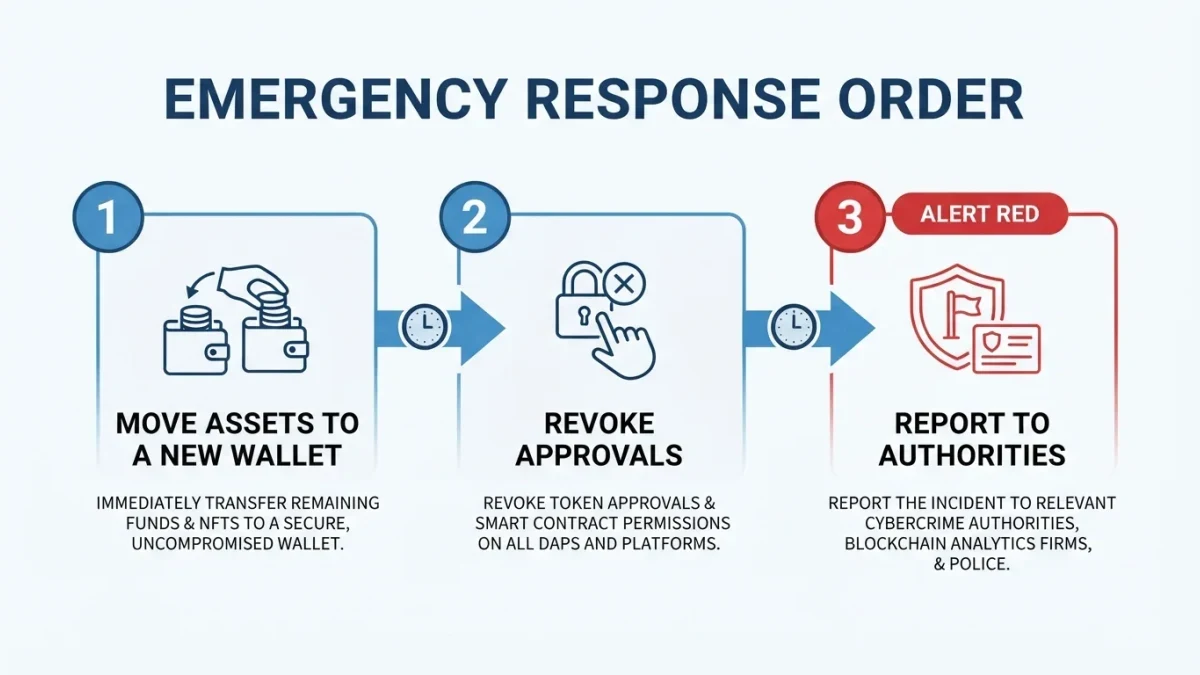

A token approval is the on-chain permission that lets a smart contract move a specific token out of your wallet. Approval scams trick you into signing one — usually behind a fake 'claim' button — and the contract drains the approved tokens later, in a separate transaction you never see. The theft is delayed; the signature is the crime scene.
This is a mechanic explainer: what an approval is, why it exists, and where it turns against you.
What am I actually signing when I approve a token?
On Ethereum and similar chains, you're signing a message that names two things: a spender contract and an amount it may take from that token's balance in your wallet. The contract doesn't take anything at signature time. It gains standing permission — which it, or whoever controls it, can use at any moment afterward.
The technical detail is one function call: approve a spender and an amount. It exists because tokens live at their own contracts, so another contract — a swap, a lending pool, a marketplace — cannot move them without your standing consent. Every swap you have ever made started with one of these signatures.
That is the honest framing: approvals are not a bug. They are the mechanism that makes decentralized exchanges usable, and the same mechanism, pointed at a hostile contract, is the mechanism that empties wallets. The tool has no opinion about who holds it.
What is an unlimited approval, and why is it risky?
Many apps ask to spend the maximum possible amount so you never re-approve after topping up — convenient, and standard practice for years. The risk compounds: one careless signature grants a contract rights over your entire balance of that token, forever, until you revoke it. Future you inherits whatever present you signed.
The maximum amount isn't metaphorical. The number most interfaces request is the largest value the chain can represent — effectively infinite for any real balance. Wallets and swap interfaces increasingly offer exact spend limits instead; some default to them. Choosing a limited approval costs you one extra signature when the limit runs out, and costs an attacker their whole payday.
Two properties make unlimited approvals uniquely awkward. They survive the site that requested them — the permission lives on the token contract, not in any browser session. And they're invisible: nothing in your wallet shows a list of standing permissions until you go looking with the right tool.
How does the claim-to-approve scam work, step by step?
The bait varies — a reply under a desperate post, a search ad, a QR sticker, an unsolicited token with instructions attached — but the funnel is remarkably consistent.
- Bait arrives. A message, comment, or token in your wallet points to a site promising an airdrop, refund, mint, or 'unclaimed balance.' Urgency is applied: the offer expires soon.
- The page asks you to connect. It looks professional — often a clone of a real project. Connecting alone grants nothing, which is why the page immediately moves to step three.
- The 'claim' opens a wallet dialog. This is the payload. The dialog is an approval — frequently unlimited — naming the attacker's contract as spender. Small text, a familiar-looking button, and a moment of excitement do the rest.
- You sign; nothing visible happens. A 'pending' or 'come back later' message covers the silence, because the drainer contract often waits before pulling tokens, to batch withdrawals and dodge quick revocations.
- The drain executes later. A separate transaction moves the approved tokens out. It appears in your history as the moment of discovery, not the moment of error.
Real deployments of this pattern have been costly. In November 2021, the DeFi platform BadgerDAO reported losses of roughly $120 million after attackers compromised the website's scripts and pushed malicious approval prompts to visitors — victims signed what looked like routine interactions, as reported at the time. The infrastructure improved afterward; the underlying signature did not change.
How do I check and revoke old approvals?
Revocation tools list your standing approvals and send a transaction canceling each one. Community-built options include revoke.cash and the token-approval pages of block explorers like Etherscan; treat any site in this category with the same domain discipline as your exchange, because fake revocation sites are a known phishing spin on the cure.
- Open the revocation tool you verified and bookmarked. Bookmark first, from a source you trust — the tool's job is guarding permissions, and a counterfeit version harvests signatures instead.
- Connect and review the list. Each entry shows the token, the spender contract, and the amount allowed. Expect unfamiliar names from old experiments; that is normal, and part of the exercise.
- Revoke what you don't recognize or no longer use. Revoking costs gas per transaction, so prioritize approvals with unlimited amounts on tokens you still hold.
- Re-check after every new interaction. Approvals added today sit silently until you look again; a quarterly habit is plenty for most people.
How can I make approvals less dangerous in the first place?
Reduce the blast radius before the signature, not after.
- Prefer exact spend limits where the interface offers them. A limited approval for the amount of the swap caps the damage at that amount.
- Keep a separate wallet for experiments. New sites and mint pages get the wallet that holds lunch money, not the one that holds savings — moving funds between your own wallets is cheap.
- Read the dialog as a sentence: which token, which spender, what amount. If the interface can't or won't show those three things, that absence is the answer.
- Confirm on a hardware wallet screen where possible, with contract-data display enabled — the site summarizes; the device shows.
None of this makes approvals safe, and the goal isn't fear of every dialog box. The goal is a default posture: every approval is a standing grant, every grant should be as small as its purpose allows, and every grant outlives the website that asked for it.